THE CLEAR ANSWER
An Xtream IPTV login usually uses three provider-issued values: server address, username and password. A complete M3U playlist link uses a different input route. Match the supplied format to your exact player, confirm account activation, and keep all private access values out of public tools and screenshots.
- A server address, full playlist link and guide URL serve different jobs.
- Use the original activated account details and the matching input labels.
- Check actual playback separately from catalogue loading and programme listings.
What is an Xtream IPTV login?
An Xtream Codes-compatible login is one way a player connects to a viewing account: a server address, a username and a password. It describes the connection method. It does not identify a single viewing service, promise a particular channel package or include a subscription by itself.
A provider can supply the same account through a supported M3U link instead. The MaxPlayer publisher’s setup instructions, for example, distinguish its single-link M3U route from its three-field Xtream route. This is evidence about those documented inputs, rather than a claim that every player uses the same menus.
Choose a player first by your actual device and its accepted account formats. Our device-based IPTV player comparison helps with that decision. A familiar app name on a seller’s page is not enough to establish that your exact edition supports the supplied format.
Match the information to the input you actually see.
Read the labels before entering anything. A field called playlist name is usually your own label; server or host identifies where the account connects. The viewing username and password come from the provider’s access message, rather than your Google, Apple or email account.
| What you received | Matching route | What to enter |
|---|---|---|
| Server, username and password | Xtream Codes / compatible account login | Each value in its corresponding field |
| A complete private playlist link | M3U / playlist URL | The full link, including its account-specific path or query |
| A separate XMLTV guide link | EPG / guide source | The intended schedule link, where required |
For an illustrative account, a server might look like https://tv.example.invalid:8443, with a separate username and password. That is a fictional address, not an Apollo server or a working account. Do not copy example details into your player.
The URI syntax standard distinguishes the scheme, host, port, path and query. That explains why a short server address and a complete playlist URL are different pieces of information. Keep the supplied scheme and port; do not remove part of the address or change HTTP to HTTPS by guesswork. Ask the provider for a supported secure endpoint if needed.
A real three-field example from our Windows record.
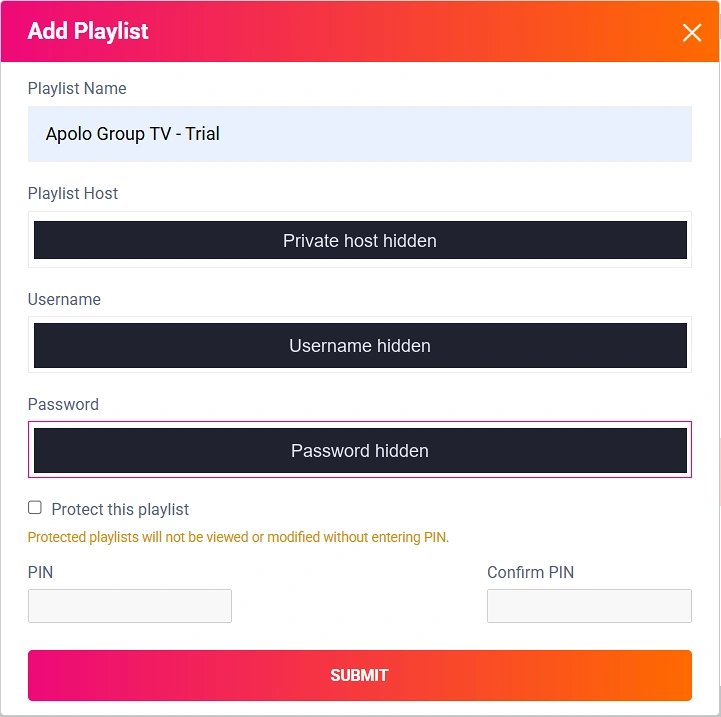
The important detail is the separation of the three labels. A form asking for Playlist Host is not asking you to place a full credential-bearing playlist link into every field. Use the information issued for the selected route, then reload the corresponding playlist in the player as its instructions require.
The owner reported successful live, movie and series playback with sound in the recorded Windows sessions, with no buffering noticed. Those reports describe those sessions only. This screenshot does not establish performance in another app or on another device. The complete IBO Player Pro walkthrough gives the wider context.
Set up one connection and check one useful session.
- Confirm activation. A submitted request and an activated viewing account are different stages. Find the access email and its stated term.
- Choose the matching input. Use the separate-login route for three account values, or the playlist route for a complete M3U link.
- Copy carefully. Preserve the issued values and remove accidental leading or trailing spaces. Do not substitute an app-store or website password.
- Save once and let the import finish. Repeated changes make it harder to identify the setting that mattered.
- Check representative viewing. Open a channel or title you actually need, then check sound and controls. A loaded catalogue alone is not a playback test.
- Check the guide separately. Note whether the intended programme information appears for that channel.
For a documented software example, the M3U Editor project’s client reference exposes separate account, playlist and XMLTV outputs and shows how clients consume them. Its server examples and automatic-guide behaviour belong to that software; they are not universal settings to impose on an Apollo account.
Find the next check without wiping a working setup.
- The login is rejected.
- Check the selected input route, account activation and the three issued values. If it still fails, report the exact error, app version and device to the provider. Do not post the credentials.
- The catalogue loads but one title fails.
- Record that title, category and error. Try another representative item to establish whether the problem is specific or affects the whole account.
- Video plays but the guide is empty.
- Keep the working playback settings and check the intended guide source and channel match. The EPG troubleshooting guide explains those separate checks.
- Playback stops when another device starts.
- Check the plan’s allowed concurrent sessions and whether another player remains active. An extra login or app installation does not add another permitted stream.
Change one relevant setting at a time and preserve the last working details. This gives support a useful comparison and avoids rebuilding favourites or playlists unnecessarily.
Choose viewing access with the setup cost clear.
If you are still choosing a service, confirm your required channels or titles, device model and the accepted input before selecting a longer term. Apollo can supply private M3U or Xtream-style access details after manual activation. Any third-party player fee is separate.
Apollo starts at $14.99 USD upfront for one month and one simultaneous stream. One stream for twelve months is $79.99 paid upfront; that is approximately $6.67 per month equivalent, not monthly instalments. There is no automatic renewal. See the current plan totals for your chosen term.
The request form takes no payment. The team emails applicable payment instructions, confirms payment and activates access manually before emailing the connection details. The Apollo ordering walkthrough shows the process. If the device still needs checking, the optional 24-hour trial begins at manual activation, requires no payment details and has no automatic paid upgrade.
Five useful questions.
Is Xtream IPTV one particular subscription service?
The phrase can describe an Xtream-compatible account connection. It does not by itself identify a single seller, channel package or subscription. Confirm the business that supplies your access.
Can I paste an M3U URL into the server field?
Use the route intended for the supplied format. A complete playlist link belongs in a supported M3U input; separate account fields need the provider-issued server, username and password.
Should I change the port or add HTTPS?
Preserve the issued address. A different port or scheme may reach a different endpoint or fail. Ask the provider for its supported secure connection instead of changing it by guesswork.
Why does my login work but the TV guide stay empty?
Playback and guide information are separate checks. Confirm the intended guide source, successful update and channel mapping before changing a working viewing login.
Does buying the player activate an Apollo account?
Player software and viewing access are separate purchases. Apollo access is activated manually after payment confirmation; the request form itself takes no payment.
Sources and scope.
Primary references checked October 31, 2026: the linked MaxPlayer input guide, M3U Editor client documentation and URI syntax standard. Original explanations and fictional examples are distinguished from the genuine October 22 owner-provided IBO portal screen. No new device or playback test is claimed.
YOUR NEXT STEP
Make the setup clear before you commit.
Identify the exact player and account format, check the viewing that matters to you, then choose a term with its full price clear.
Choose my Apollo plan →