APOLLO GROUP TV SUBSCRIPTION / THE QUICK ANSWER
An Apollo Group TV subscription starts at $14.99 for one month and one simultaneous stream. Choose 1, 3, 6 or 12 months, request payment instructions, then receive access after payment confirmation and manual activation. The full term is paid once, with no automatic renewal.
This is a buying guide from Apollo Group TV about the plans sold at apolotvgroup.com. Prices and account instructions apply to this website. Similarly named services can have different accounts and terms.
Choose your term. See one full total.
Start with the four term choices above. One stream costs $14.99 for 1 month, $34.99 for 3 months, $59.99 for 6 months or $79.99 for 12 months. Each choice opens the request form with that term and total selected.
Extra simultaneous streams are optional. Adjust them on the request page or view full pricing.
Shorter commitment or a longer term?
One month costs $14.99. Twelve months costs $79.99 upfront, equivalent to about $6.67 per month. That equivalent helps you compare; it is not a monthly charge. Pick the commitment you are comfortable making.
If you want to check the device first, ask us about your exact model or use the optional 24-hour trial. It requires no payment details and does not turn into a paid plan automatically.
Trying first? The Apollo trial notebook helps you turn that first session into a clear buying decision.
One person watching? Keep it simple.
The prices above include one stream at a time. Owning a TV, phone and tablet does not automatically mean you need three simultaneous streams. If several people will watch together on different devices, choose the extra allowance in full pricing. Tell support about multiview or an unusual setup before paying.
What your subscription covers.
Your Apollo subscription is viewing access for the paid term and simultaneous-screen allowance you select. The service includes live TV and on-demand viewing libraries, with access details emailed after manual activation. Check the particular channels, languages or titles important to you before payment because availability can change.
- Your chosen paid term: 1, 3, 6 or 12 months.
- Your chosen connection allowance: 1–5 simultaneous screens.
- Setup details by email: the access information and instructions for your confirmed device and app.
- Email support: contact apologrouptv.support@gmail.com for plan or setup help. Email support is available 24/7; no fixed reply or activation deadline is promised.
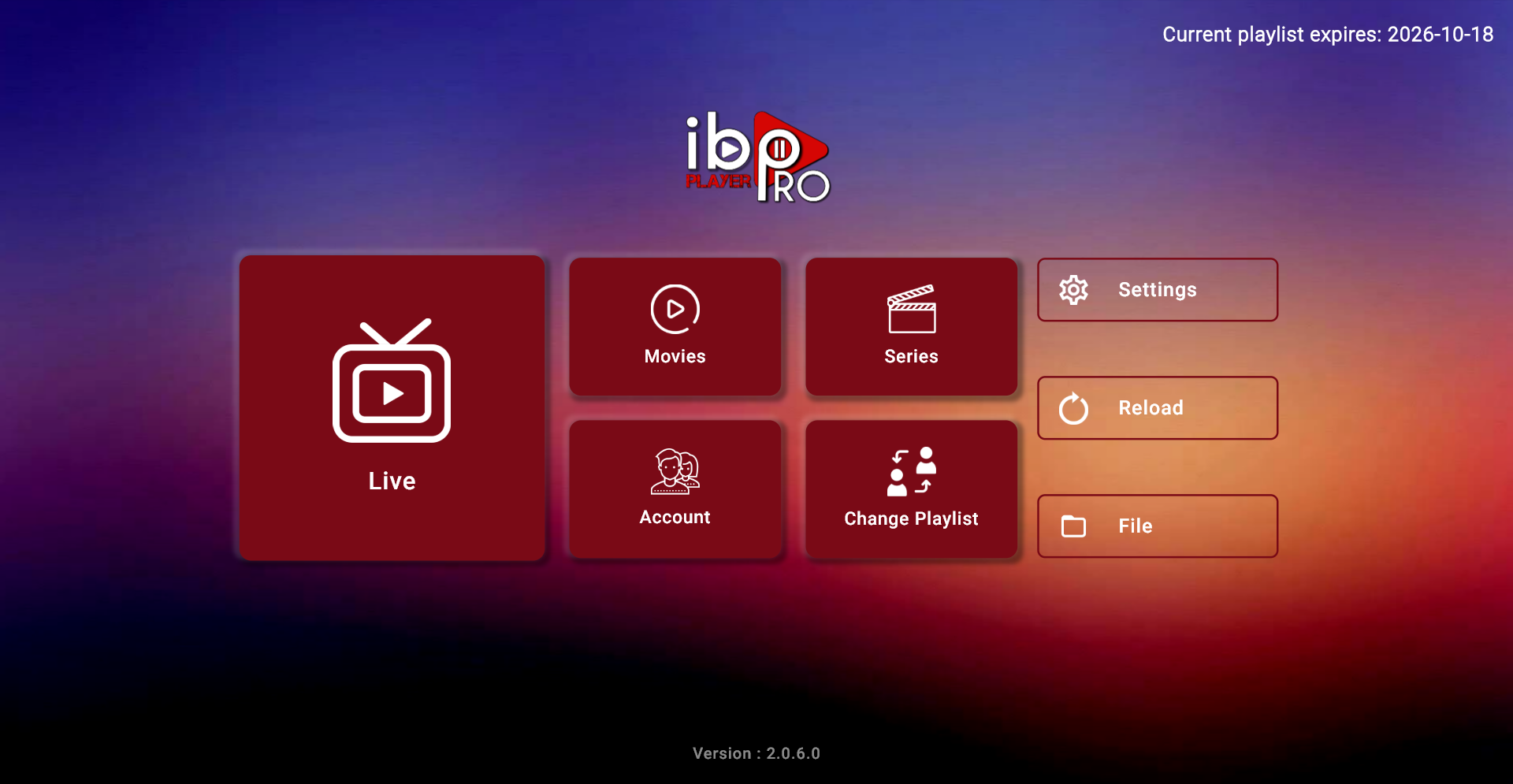
Your TV, internet connection and any separate player licence are additional considerations. A player purchase does not buy an Apollo plan. For an already configured Windows player, our documented M3U setup walkthrough shows the connection process; Fire TV buyers can use the model-first Firestick buying guide.
Count the streams you will actually use at the same time, rather than every device you own. Compare the full term total with your budget, then check the exact device model, app edition and region. Roku guidance covers casting; it does not establish a native player for every Roku model. Check your device route and confirm any separate player fee before paying.
See the real buying process, step by step.
Choose a term above, then check the selection on the request page. The screenshots below were captured on this website with every customer field left blank. No order or payment was submitted to make them.
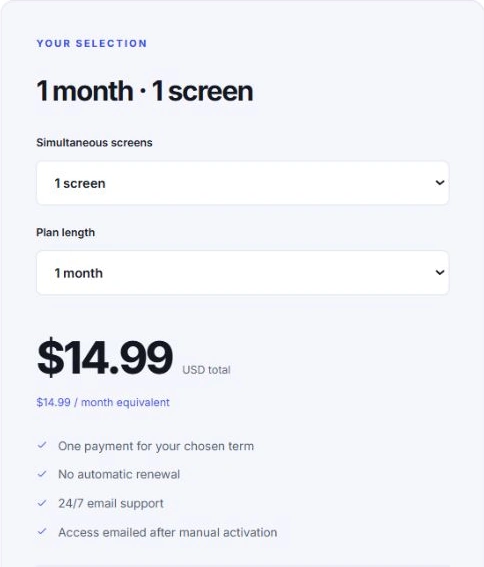
1. Check your term and total.
The summary shows your term, simultaneous allowance and full USD total. In this example, one month for one stream is $14.99. You can change the selection before sending your request.
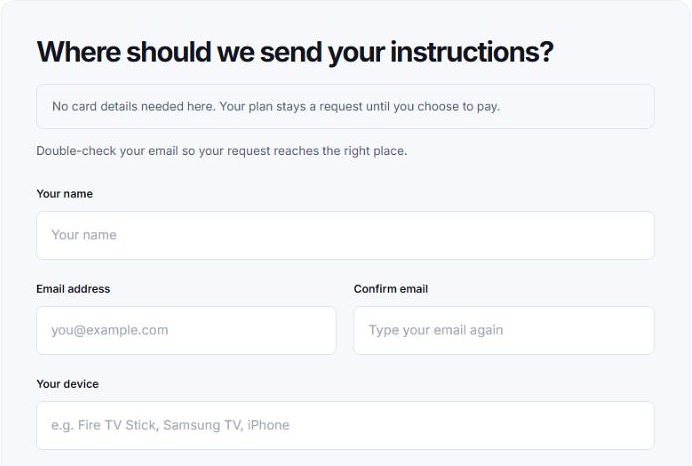
2. Tell us where to send the instructions.
Enter your name, email twice and device model. Use an inbox you can access. A precise model helps us check the right player and connection method. Card numbers, passwords and playlist credentials do not belong in this form.
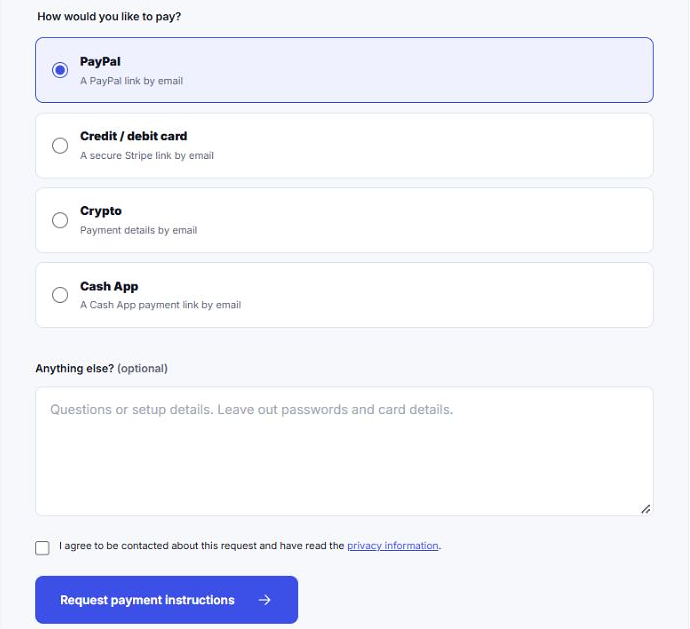
3. Choose your payment preference and send the request.
Choose PayPal, card, Cash App or crypto. The form records your preference; sending it does not charge you. Review the privacy information, confirm you want the team to contact you and use “Request payment instructions”. Keep the request reference and status page shown after a real submission.
4. Review the email, then receive your activated access.
We review your request and email the appropriate payment link or instructions. Check the term, price and method before paying. Once the team confirms payment, your viewing account is activated manually and access details are emailed with setup guidance.
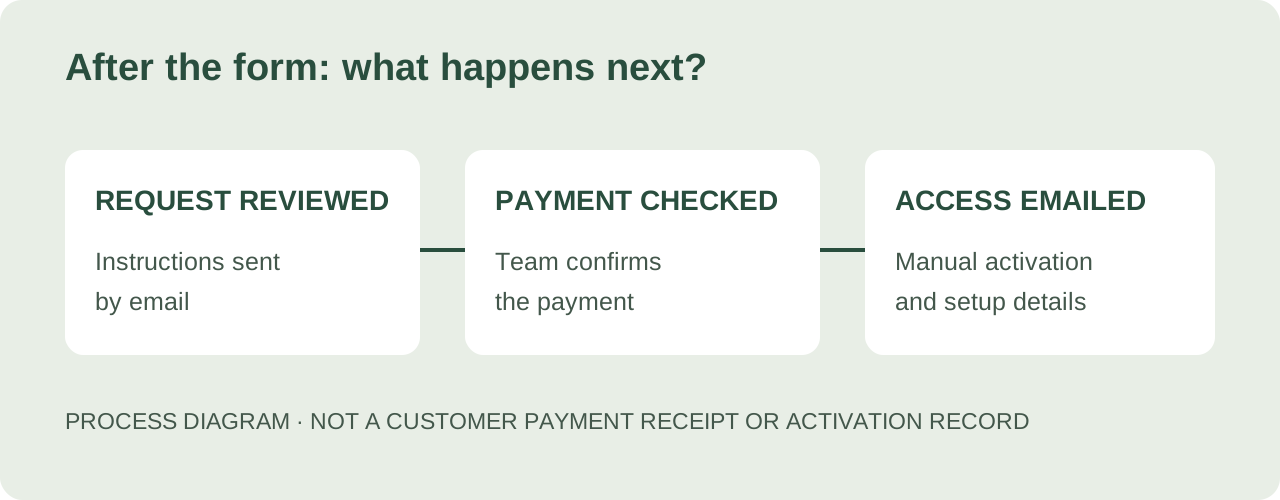
Check Spam if an expected email is missing. For an update, contact apologrouptv.support@gmail.com with your request reference. Sending a request, paying and receiving activated access are separate stages; no fixed activation deadline is promised.
What the payment and access emails can look like
These are sample email templates prepared for this walkthrough. They are not sent customer emails, payment receipts or proof of a completed activation. Real messages contain the confirmed plan and the private link or account details for that customer.
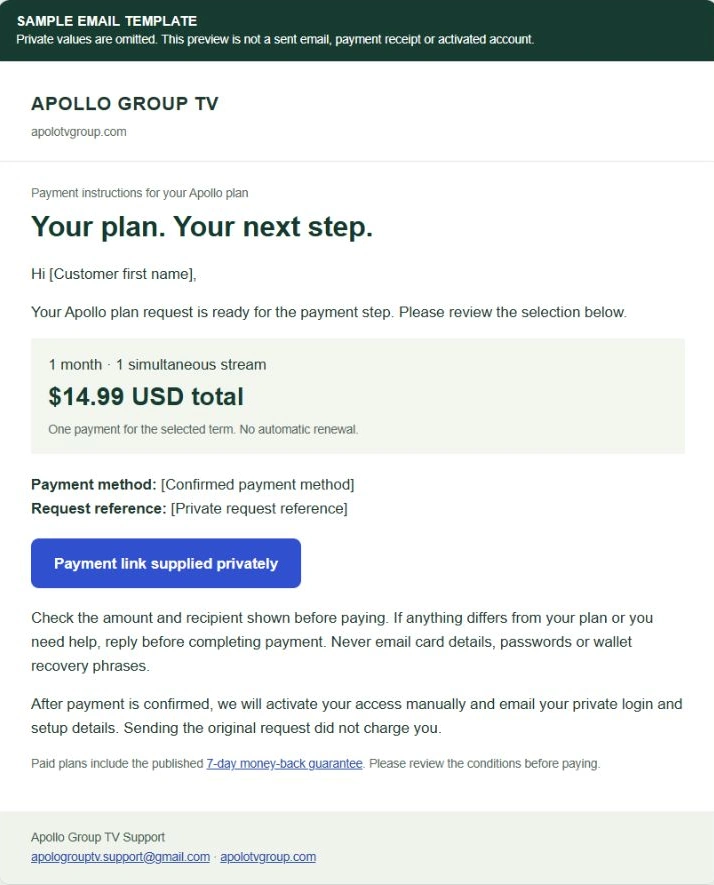
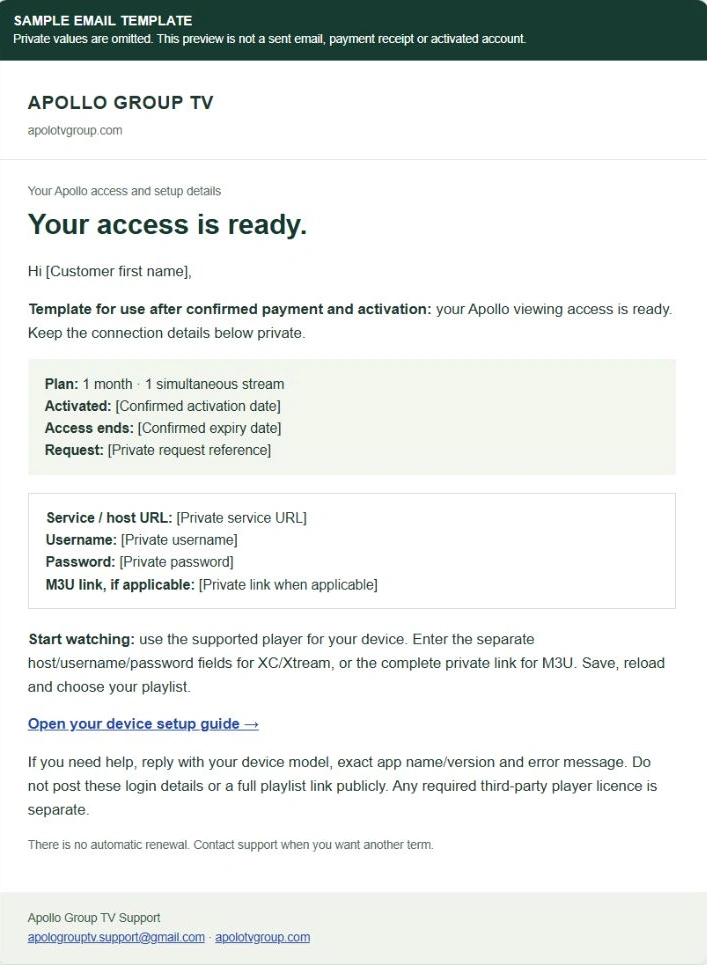
Choose how you would like to pay.
The request form offers the methods below. The team sends the corresponding link or instructions after reviewing your request.
PayPal
Receive the payment link by email.
Credit or debit card
Choose card payment; the team confirms and emails the applicable payment instructions.
Cash App
Receive a Cash App payment link or instructions.
Crypto
Receive the payment details to review before sending.
Choose the method you intend to use; do not enter card numbers in the request notes or email them to support. The website’s request form records your preference rather than charging a payment.
These payment options apply to apolotvgroup.com. Similarly named websites can use different account systems and payment methods. If you already bought access elsewhere, contact the website that took that order; this form does not manage another provider’s account.
Know the next-term and refund rules.
Apollo plans on this website do not renew automatically. For another paid term, contact support with your existing request reference and desired plan. Let the team confirm the next term and payment instructions; do not assume a payment link from an old order still applies.
The paid-plan money-back guarantee covers refund requests made within seven days of paid-account activation, under the published refund conditions. Email support with your order reference and the reason for the request. Refunds are reviewed and handled manually; no fixed processing time is advertised.
Before purchasing a longer term, confirm your exact device and the viewing needs that matter most. A clear total, a suitable screen allowance and a working setup make the plan easier to choose confidently.
Before you subscribe, get the details.
How much is an Apollo Group TV subscription?
On apolotvgroup.com, one-stream plans cost $14.99 for 1 month, $34.99 for 3 months, $59.99 for 6 months or $79.99 for 12 months. Optional extra streams have different totals, available in full pricing or on the request form. Prices are in USD and the full selected term is paid upfront.
Does the annual plan charge me every month?
No. The annual term is paid upfront. For example, $79.99 for one screen is the full 12-month price; about $6.67 per month is only a comparison. These plans have no automatic renewal.
How many people can watch at the same time?
Choose a plan for 1–5 simultaneous screens. Count streams that will run at the same time, rather than just counting devices you own. Confirm your intended devices and viewing locations with support.
Can I pay with a credit card or PayPal?
For plans sold by apolotvgroup.com, the request form offers PayPal, credit/debit card through Stripe, Cash App and crypto. After review, we email the relevant payment link or instructions. No payment is taken in the request form.
Will my subscription activate instantly?
No. We review the request, email payment instructions, confirm payment and activate access manually. Access details are then emailed. No fixed activation or response time is promised.
Are these the prices for every Apollo Group TV website?
No. This guide quotes the Apollo Group TV offer at apolotvgroup.com only. Similarly named websites may have different plans, payment methods and account systems. Confirm the exact domain before ordering, and contact your original seller for an existing account.
Does a paid plan include a player licence?
The subscription supplies viewing access. Any separate player licence, your hardware and internet service are not automatically included. Confirm your device and player before payment.
How do I renew my Apollo plan?
There is no automatic renewal. Contact support with your existing request reference and the term you want. Wait for the team to confirm the next term and payment instructions.
Can I request a refund?
Paid-plan refund requests must be made within seven days of paid-account activation under the published refund policy. Email support with your reference and reason. Processing is manual; no fixed refund completion time is advertised.
Can I check my device before buying?
Yes. Ask support to confirm your model and app. An optional 24-hour trial for one simultaneous screen is available after manual activation, without payment details or automatic paid upgrade.
Offer & source notes
Published October 19, 2026. Prices are taken from this website’s plan catalogue and match the totals used by its order system. This article explains our own offer rather than an independent review or an affiliation with another service.
- Current plan totals and the request and activation process.
- Paid-plan refund policy, terms and privacy information.
- The documented Windows viewing setup, with its original screenshot and test limitations.
This guide covers Apollo Group TV at apolotvgroup.com. Prices, support and account instructions here do not apply to apollogroup.tv or another similarly named domain.
Updated November 1 with consolidated plan-selection guidance and clearly labelled payment/access email templates. Genuine blank-form screenshots retain their capture dates. Prices are checked against the site catalogue. Screenshots show the website’s real request journey, with customer fields left blank.
Plan the complete setup budget.
The subscription cost planner combines the selected Apollo term with your own optional app and hardware budgets. No personal details are needed.