THE SHORT ANSWER
The right IPTV service matches the channels you want, the device you use and the full amount you agree to pay. Compare the actual package and app setup before choosing by price alone. Apollo at apolotvgroup.com offers prepaid access from $14.99 USD for one month with one stream, an optional 24-hour trial and manual activation after payment confirmation.
Published by Apollo Group TV, which sells one of the offers discussed. Competitor details use the linked provider sources; original Apollo screenshots and owner-reported Windows observations are identified separately.
Start with the viewing you actually want.
An IPTV service delivers television over an internet connection. In everyday shopping, the term includes offers with different channel packages, apps and account systems. A large catalogue or a “premium” label does not tell you whether a particular local feed, programme or device is included.
Write down your must-have channels, region and language, then check the exact package. For Apollo, use our channel enquiry route or the dated catalogue screenshots. For another service, use its own location and lineup lookup. Choose the service that answers your actual viewing question.
Buying access and buying a player are separate decisions. A media player can open correctly without including a channel subscription. The VLC publisher, for example, describes player software; installing a player does not buy Apollo access.
Three offers. Different ways to subscribe.
Published by Apollo, this comparison uses each provider’s documented offer. Prices below were checked October 30, 2026. They use standard monthly or advertised starting amounts rather than introductory discounts; package, location, tax and optional extras can change the final quote.
PREPAID VIEWING ACCESS
Apollo Group TV
$14.99 USD / one month, one stream
Choose a prepaid term and use compatible player details supplied after manual activation. One payment covers the selected term; no automatic renewal.
Worth checking when: you want a clear upfront commitment and setup guidance for a suitable app. Confirm your required content, device and any separate player fee.
See Apollo’s actual totals →PACKAGE-BASED LIVE TV
Sling TV
From $19.99 / month for selected smaller packages
Sling’s Essentials and Select packages start at the amounts above; Blue starts at $45.99/month. Their lineups and stream allowances differ. Cloud DVR is listed.
Worth checking when: a particular Sling package matches your channels. Local access varies by package and location.
Check Sling’s current packages ↗SERVICE APP AND CLOUD DVR
YouTube TV
$82.99 / month standard main-plan rate
The main plan lists unlimited DVR, three simultaneous streams and six household accounts. A separate Sports + News plan has a different lineup and price.
Worth checking when: the main plan’s recording and local lineup suit your household. Check your home ZIP code and current terms.
Check YouTube TV’s current offer ↗Compare the actual channel package and features as well as the price. The services have different content arrangements, apps and support; the comparison uses published information rather than comparative playback tests.
See what an Apollo plan selection actually shows.
Our request page displays the selected term and full USD total before you enter customer details. The genuine screenshot below shows one month and one simultaneous stream for $14.99. The monthly equivalent is a comparison; it does not create a recurring monthly bill.
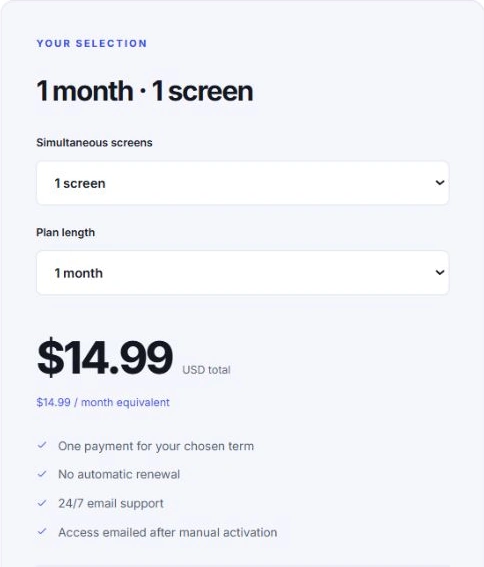
For one stream, other prepaid totals are $34.99 for three months, $59.99 for six months and $79.99 for twelve months. The year’s monthly equivalent is about $6.67, but $79.99 is the upfront payment. Optional extra simultaneous streams change the total. Use the complete setup-cost planner for any app or hardware budget, or the Apollo subscription walkthrough for the detailed buying process.
Make the app fit your device before you pay.
For Apollo, a compatible third-party player uses the supplied M3U link or separate Xtream-style server, username and password. Those are different input routes. Follow the exact app and publisher for your device, rather than a tutorial for a similar name.
The owner’s October 22 Windows sessions reported successful live TV, movie and series playback with sound in IBO Player Pro, Smarters IPTV and TvMate IPTV Pro, with no buffering noticed. This is a dated owner-reported experience, not a timed benchmark, a competitor test or a guarantee for every connection.
Start with the genuine IBO Player Pro setup screens or SmartersPlayer LLC Windows walkthrough. Windows TvMate IPTV Pro is a separate product from Android TiviMate. For a television or tablet, use the matching installation guide; our Windows observations do not establish tests on those devices.
A separate player activation fee may apply. Check it before buying viewing access. You do not need to buy a new box if a supported device you own already meets your needs.
Use a trial to answer your last buying question.
Apollo’s optional trial lasts 24 hours for one stream at a time, beginning when the team manually activates it. Requesting it does not start the clock. No payment details are required and it does not turn into a paid subscription automatically.
Use the actual screen and connection you intend to keep. Find the content that matters, check picture and sound, open the guide if you use it, and try another session later. A catalogue that loads is not the same as every required programme playing. The trial checklist gives you a small practical record.
Request the trial with your device model. If you already know the setup fits, choose your paid term.
Three checks before choosing a subscription.
Keep track of the three decisions that matter before buying. Your checks stay on this page, and you can explore the plans at any point.
0 of 3 buying checks complete. Confirm your viewing needs first.
If content is uncertain, ask a precise channel or setup question. If the device still needs a real check, use the trial. When those questions are answered, choose the term you are comfortable buying.
Know what happens between choosing and watching.
- Select the plan. Check its full term total, allowance and your device.
- Request instructions. Enter your name and email, device and preferred payment method. The website takes no payment at this stage.
- Review the email and pay. Check the supplied amount and applicable method before completing payment.
- Receive activated access. After payment confirmation, the team manually activates the account and emails setup details. Contact support if you need to confirm activation timing.
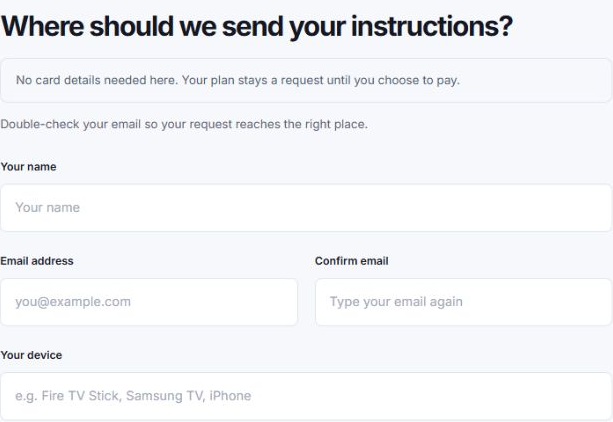
Choose your preferred payment method on the request page, then review the applicable instructions sent by email. Read how payment and activation work and the published seven-day paid-activation refund conditions before deciding. Contact support with your request reference if something is unclear.
Questions before you choose.
Which IPTV service should I choose?
Choose the package that confirms your required content, supports your actual device and has a clear full cost and signup process. This first-party comparison describes selected offers rather than declaring an independently tested winner.
Does an IPTV player include a subscription?
A player and a viewing service are separate purchases unless an offer explicitly includes both. Check any app fee and the provider access you will receive before paying.
How much does Apollo cost to start?
One month with one simultaneous stream costs $14.99 USD upfront. Other terms and extra streams have different totals. There is no automatic renewal.
Can I test Apollo without entering card details?
Yes. The optional 24-hour one-stream trial requires no payment details, begins after manual activation and does not automatically become a paid plan. A separate player licence may still be needed.
Does paying for an app guarantee smooth 4K playback?
No. The stream, player, device, display and connection all matter. The owner-reported Windows sessions document those sessions only. See the 4K requirements guide and check your own setup.
Is the plan request an instant purchase?
No. You request payment instructions, review the email, pay through the applicable method and receive access after payment confirmation and manual activation.
Sources and review notes
Selected published offers checked October 30, 2026. Apollo screenshots were captured on this website with blank customer fields. Windows playback observations were supplied by the owner on October 22; they do not establish competitor or cross-device testing.
- Apollo’s current term totals, request and manual activation process, and refund conditions.
- Sling’s current package comparison, DVR and local-channel information.
- YouTube TV’s main plan, current offer and home-ZIP lookup.
- VideoLAN’s description of VLC player software.
Similarly named Apollo services can have different accounts and terms. This article describes plans sold at apolotvgroup.com. No affiliation with the other providers or player developers is claimed.